

Tuesday, September 20, 2011
Be In Here!
(Generaly speaking), it pays to volunteer to go first/early when a group of people have to present. Your audience has less of an expectation and greater level of attention.


Monday, September 19, 2011
Simple Machine Challenge pt I - Mousetrap Racecars!

We've learned about a number of simple machines in the Principles of Engineering courses. A common theme amongst these devices is the concept of using mechanical advantage to trade force for distance or distance for force. How can we use this trade off in context in the classroom?
For this challenge you and a team mate will design, build and compete with a Mousetrap racecar. Specifically, you will use a third class lever and a wheel and axle simple machine to prototype a race vehicle.
Criteria:
Design, build and compete with a Mousetrap Racecar (A "car" uses at least two axles).
Maintain a clean workspace.
Constraints:
One mousetrap
No more than 12" of masking tape
Fischertechnique robotics parts
No more than 24" of string
You must work through the stages of the event (see Achievements below)
Additional materials by Instructor approval
Achievements (by stage):
Post your results for the Simple Machine Challenge pt I to your blog. Tally your total number of Achievements earned and justify each within the post. Your grade is the total number of Achievements you earn curved against the number of Achievements your classmates earn.
Design:
"Brainiac" - Brainstorm solutions for your design. Generate a list of at least 10 ideas/concepts.
"Visualize It!" - Create a sketch of a design and label key features.
Build:
"Build It" - Build your design. Document it with a photo.
"The Price of Glory" - If each part you use costs $1, generate a total cost for your build (This info will be used to generate "cost" data to add a pricing element to the game next year).
Test (Compete):
Each car will compete on its own. Everyone will take 3 turns and use their best result. Cars are evaluated on acceleration and total distance covered. Generate your design accordingly.
"Competitor" - Compete in the 2nd Annual Mousetrap Racecar Challenge.
"Long Distance Winner!" - Travel the furthest in the race.
"Going the Mile!" - Travel the furthest or second furthest in the race.
"Led Foot" - Be the team with the fastest time covering the first 24" of the track.
"Heavy Foot" - Be the team with the fastest or second fastest time to cover the first 24" of the track.
"Feedback" - Collect feedback (at least one each of +, change, ? and !) from yourself or your classmates.
Iterate:
"Re-work" - Change your build based on your experience with the race/feedback you collected. Document any changes.
"Game Changer" - Develop a new rule or change to the game that you feel would make the event better. Explain your concept.
"Name it" - Invent a name for an achievement that you think is better than what we have currently.
Clean Up:
"Leave It Cleaner Than You Found It" - Did you leave your workspace cleaner than you found it? Explain.
Reflection:
"Design/Build" - What is a "Design/Build" process? How did your experience with this challenge relate to that? Why might you experience this in a career related to technical innovation?
There may be an option to compete again (with the same or new rules) depending on the input we receive from the teams and the timeliness with which we complete the event.
Sunday, September 18, 2011
Professional Interview
A primary objective of the Principles of Engineering course is to give our students a perspective on the different fields of engineering one could persue beyond High School. What better way to work towards this awareness than to conduct an interview with an engineer?
A selection of interesting people with engineering backgrounds. How many of these people can you name?:

Overview
Conduct a personal interview with a professional in the field of engineering, engineering technology, or another high-tech, high-demand field. Interview documentation must follow the outline format described below and consists of three major components: Professional Background; Interview; Interviewer Reflection. Completed interview documentation must be posted to your online portfolio (blog).
1. Discuss with your instructor who you would like to interview. Obtain instructor approval.
2. Contact the person you will be interviewing and obtain consent.
Professional Background
3. Gather the information below. Use the buddy system for all interviews. No interviews are to be conducted in private
a. Interviewee name:
b. Interviewee’s specific degree:
c. Interviewee’s place of employment:
d. Interviewee’s email address and/or phone:
Professional Interview
4. Ask interviewee the questions listed below and record exact responses in your engineering notebook. If you wish to ask additional questions, seek instructor approval.
· Please describe your engineering field.
· What is your current job title?
· Please describe your particular job and duties.
· What is your average work schedule?
· Starting with high school, describe your educational background chronologically.
· If you had it to do over, related to your career or education, would you do anything differently?
· What advice would you give to me as someone interested in pursuing a career path similar to yours?
Personal Reflection
5. Reflect on your completed interview and answer the following questions. You may also add additional reflections or thoughts.
a. What surprised you the most about the interview?
b. What was the most important piece of information that you learned form the interview?
c. How has this interview influenced your feelings about your future career?
A selection of interesting people with engineering backgrounds. How many of these people can you name?:

Overview
Conduct a personal interview with a professional in the field of engineering, engineering technology, or another high-tech, high-demand field. Interview documentation must follow the outline format described below and consists of three major components: Professional Background; Interview; Interviewer Reflection. Completed interview documentation must be posted to your online portfolio (blog).
1. Discuss with your instructor who you would like to interview. Obtain instructor approval.
2. Contact the person you will be interviewing and obtain consent.
Professional Background
3. Gather the information below. Use the buddy system for all interviews. No interviews are to be conducted in private
a. Interviewee name:
b. Interviewee’s specific degree:
c. Interviewee’s place of employment:
d. Interviewee’s email address and/or phone:
Professional Interview
4. Ask interviewee the questions listed below and record exact responses in your engineering notebook. If you wish to ask additional questions, seek instructor approval.
· Please describe your engineering field.
· What is your current job title?
· Please describe your particular job and duties.
· What is your average work schedule?
· Starting with high school, describe your educational background chronologically.
· If you had it to do over, related to your career or education, would you do anything differently?
· What advice would you give to me as someone interested in pursuing a career path similar to yours?
Personal Reflection
5. Reflect on your completed interview and answer the following questions. You may also add additional reflections or thoughts.
a. What surprised you the most about the interview?
b. What was the most important piece of information that you learned form the interview?
c. How has this interview influenced your feelings about your future career?
Wednesday, September 14, 2011
Student Blog Links: 6th Period

6th Period - please comment on this blog post with your blog title and blog url listed. I will use these addresses to make a list of class links on the right sidebar. Thanks!
As an example:
"Hi 6th Period! Hi Mr. Olson!
My blog is called Creative Problem Solvers!
The url is www.creativeproblemsolvers.blogspot.com"
Student Blog Links: 5th Period
5th Period - please comment on this blog post with your blog title and blog url listed. I will use these addresses to make a list of class links on the right sidebar. Thanks!
As an example:
"Hi 5th Period! Hi Mr. Olson!
My blog is called Creative Problem Solvers!
The url is www.creativeproblemsolvers.blogspot.com"
Student Blog Links: 4th Period
4th Period - please comment on this blog post with your blog title and blog url listed. I will use these addresses to make a list of class links on the right sidebar. Thanks!
As an example:
"Hi 4th Period! Hi Mr. Olson!
My blog is called Creative Problem Solvers!
The url is www.creativeproblemsolvers.blogspot.com"
Scrum Task Card v1.0
We're going to use an agile development methodology called Scrum for our Engineering Projects course.
The process involves tracking progress on tasks on a team board. We'll try the following format for our Task/User Story Cards. This format may change based on our experience in the process:
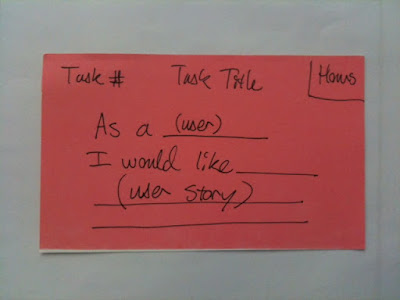
The process involves tracking progress on tasks on a team board. We'll try the following format for our Task/User Story Cards. This format may change based on our experience in the process:

Tuesday, September 13, 2011
"I'm Sorry Dave, I'm Afraid I Can't Do That..."

This is a follow on for when we get back to programming next. We can continue from where we were with our "Hello World!" C++ program and modify it to replicate the best artificial intelligence that our space program can buy.
Challenge:
Craft a program that functions like the frustratingly perfect HAL 9000 from Stanly Kubric's seminal movie 2001.
Specifically:
(1pt) - Prompt the user to enter their name (see tips below)
(1pt) - Ask the user what they'd like to have HAL 9000 do and always reply with "I'm sorry (name entered), I'm afraid I can't do that"
A few thoughts that might help out:
Google C++ cin to understand how you can use the cin command to input text.
Before the main () function with the other #include place the following:
#include <string>
Inside the main () function you could use the following:
string user_input; //creates a string (text) variable named "user_input"
getline(cin, user_input); //the getline function can be used to enter a string (text) for the user_input variable
My First Blog Post!

We're getting all of our 2011-2012 students set up with their blogs. These will serve as an online portfolio of your engineering experiences.
Please Complete the following to make your blog:
1) Sign in to your Google account. Create one at www.google.com if you don't already have one.
2) Create a blog through www.blogger.com
3) Name your blog. Choose any school appropriate name that you like for your online portfolio. Since this is something that we hope will serve as a reference, please choose a title/web address appropriate to include on a resume. Consider the use of words like "Engineering", "Design", "Problem Solving", your name, etc.
Assignment for your first Post:
1) Title your post "My First Blog Post!"
2) Type some text greeting people that visit your blog.
3) Insert a photo of something you're interested in (hobby, sports team, technology, etc.)
4) Include a sentance or two of text before or after the photo explaining your interest.
5) Insert a link relavent to the photo.
6) Use the spell check feature to check your spelling.
7) Make sure your post is formated in a presentable way.
8) Add a Label to the post
Monday, September 12, 2011
Emergency Preparedness!

Thursday's county wide blackout and Sunday's 10 year anniversary of September 11th are powerful reminders that large scale emergencies can happen without warning. As designers, we will consider ways that we can be better prepared for life's unexpected events. This activity serves as an opportunity to apply the PLTW 12-step design process that is part of our Engineering and Design curriculum.
Task:
Use the 12-step Design Process discussed in class to develop an Emergency Preparedness Plan. Define the problem, brainstorm solutions, create a prototype, generate user feedback and then readjust your solution.
Criteria:
Prepare a list of essential items your family would like to have on hand for an emergency situation.
You may collaborate with your classmates in developing your plan.
Each student will prepare their own list.
Constraints:
Items required for the plan/list must be affordable for your family.
Assignment: Emergency Preparedness Supply List (5pts)
Prepare and complete the following on your blog. Ensure your product is organized and professional:
Define the Problem (1pt) - What types of emergency situations might you and your family need supplies for? Include an image at the top of your post related to one of them. List at least 3 types of emergencies you want to consider for your list.
Brainstorm Ideas (1pt) - List at least 20 ideas for supplies you could use for the given emergencies (number your ideas). Get input from at least one other student (list student next to any ideas they shared). Remember the rules of brainstorming is that there are no rules.
Generate a Solution (1pt) - Given the constraints listed above, generate a list of supplies for you and your family.
Solicit Feedback (1pt) - Get specific "+, delta, ? and !" feedback from your family. List who shared what input with you.
Refine your Solution (1pt) - Adjust your plan based on your feedback. Cite a specific change based on each category of feedback (+, delta, ? and !).
Monday, September 5, 2011
What's This? pt I
?????


What is "Open Source"? How does this support the "Hacker" mindset?
What's inside? More info to follow...


What is "Open Source"? How does this support the "Hacker" mindset?
What's inside? More info to follow...

Sunday, September 4, 2011
Robotic Assembly Line Class Challenge!

The Engineering Projects class will construct a modular assembly line to simulate the marking and preparation for shipment of a product. This challenge is team based and each team must collaborate both amongst themselves and with the other teams in the class to achieve success. Formal and informal leadership opportunities will present themselves over the course of this experience.

Snake-eyes Dice Inc. is looking to improve their manufacturing process. Lean Six-Sigma consultants have identified their dice marking and shipment process as being a major contributor to inefficiency. Snake-eyes Dice has hired our class to design, prototype and test an assembly line based solution for them.
Challenge:
The class will simulate the marking of each side of a dice using an assembly line process. Once the dice are marked they'll be arranged for shipment in groups of 6.
Criteria:
Each section of the assembly line will perform one of the following roles and be completed by a seperate team in the class:
-Dispense simulated "dice" individually from a group for marking
-Mark the "1" side
-Mark the "2" side
-Mark the "3" side
-Mark the "4" side
-Mark the "5" side
-Mark the "6" side
-Arrange simulated dice for shipment as a group of 6
"Markings" may be approximations based on our material constraints.
All eight of the assembly line sections must function together to complete the job.
Constraints:
-All processes will be automated and controlled by software.
-Fischertechnik robotics kit parts will be used to implement the hardware solution.
-Ask Mr. Olson for approval of any marking solutions proposed.
-Programming will be done in the RoboPro visual programing environment.
-Each step of the process must occur on its own section of the assembly line (this is a team event!).
-Each "Dice" will be simulated by a 2x2x2 puzzle cube piece (1.5" x 1.5" x 1.5").
-Once the class challenge has been completed, two regular periods or one block day will be allowed to clean/organize the room and complete your portfolio entry.
Grading:
We will use an open ended achievement based grading system.
A class average of student achievement scores will be determined. For the Projects course, the total score in Edline for this challenge will be set so that the average score earns an A- (You're returning students and I'm challenging you with above average material hence a higher grade for average work). For example, if the average number of achievements earned is 9, then the challenge will be listed out of 10 in Edline. Grades will be capped at 110% of the total score (exceptional achievement will garner extra credit but not to the point of unbalancing the remainder of the Semester :) )
Achievements:
You must display evidence in your online portfolio of having completed the achievement in order to score them. The total number of Achievements that you earn is your score for this challenge.
Class Achievements:
"Implementation" - Implement an assembly line system that meets the criteria and constraints of the challenge.
"Fast!" - The system is able to complete a cycle of 6 dice in less than 1:30.
"Faster!!" - The system is able to complete a cycle of 6 dice in less than 1:00.
"Gosh Darn Fast!!!" - The system is able to complete a cycle of 6 dice in less than 0:45.
"The Clan with the Plan" - Develop a master schedule for completion of the project.
"Ninja Elite" - Meet the master schedule to the day.
"Good Enough for Government Business" - Meet the master schedule to the day or by +/- one day.
"No Half Stepping" - Complete the design and implementation phase of the challenge in less than a week.
"Don't Dilly Dally" - Complete the design and implementation phase in less than two weeks.
"Stewardship" - Return all Fischertechnik to appropriate storage upon completion of challenge. Leave the room cleaner than before the start of the game.
Team Achievements:
"Flash of Inspiration" - Brainstorm a solution for your section of the assembly line with a sketch.
"If you Build It..." - Implement a solution for your section of the assembly line.
"Proof is in the Pudding" - Implement a solution for your section of the assembly line that successfully operates with adjacent sections.
"Round and Round We Go" - Iterate on your initial implementation. Explain the challenge you discovered off the first effort and what you did to overcome it.
"Round and Round We Go... Again" - Iterate again on your implementation. Explain the next challenge you discovered with your design and what you did to solve it.
"Videography" - Capture video of the project in action.
"
"Tool Time" - Document an aspect of your solution using our Inventor CAD software. The rendering must include atleast three parts.
"Dimension It" - Label/Dimension your Inventor rendering.
"Lab Rat" - Collect data related to your implementation. Explain what you collected and how you used it.
"Show Me" - Visualize your data in a useful format. Explain your choice of presentation.
"Leave no Trace" - Return your fischertechnik to their appropriate storage locations/clean your work space.
Individual Achievements:
"Share It" - Provide feedback (Sustain, Change, Question, Idea) for another team. Who did you provide feedback to and what was it?
"Keep the Customer in Mind" - Your blog post is formated in a readable, professional manner. Writing is short and concise. Spacing is used to break up thoughts/concepts. Lists and/or bullet points are used as appropriate. No "monolithic" paragraphs.
"Nice One!" - Identify a student from outside of your team that was most helpful to your efforts. Be specific about how they were helpful.
"Helping Hand" - List a student that you helped outside of your team. How were you helpful to them?
"Meta Gamer" - Based on our grading system for this challenge, explain the benefit of earning the class achievements, even though everyone scores them when earned (use math to justify your case).
"And the Winners Are..." - Recognize class participation by selecting one person other than yourself for each of our five activity awards (Initiative, Sportsmanship, Collaboration, Humor, ...what's the fifth one we have up on the board?!)
Level Up!!!:
Capture your experience by posting to your online portfolio. You will have two class sessions (or one block day) to complete these tasks once we've completed our class assembly line design.
Organize your post as follows:
-Title
-Image/Video of class solution.
-Breif overview of challenge.
-Image/Video of your team's solution.
-Breif overivew of how you approached the design of your system.
-Total number of achievements earned.
-Breakout of achievements earned by section (Class, Team, Individual) with appropriate proof displayed (picture/data/explanation/etc.).
Friday, September 2, 2011
Simple Machine: Wheel and Axel
Andrew and Isabel show off a very clean design for the examination of a Wheel and Axel simple machine:


Wednesday, August 31, 2011


Tuesday, August 30, 2011
Everyone Works in CHS 705
Room 705 is where work gets done. It wouldn't be fair to have your parents visit for Parent Teacher Night and not put them to work.
What will I have them do?:

Card Tower Game underway:


This was one of the talest towers completed by the parents. Were you able to beat that?:

? - Why would I have your parents participate in the Card Tower Game? What are three purposes this activity served?
What will I have them do?:

Card Tower Game underway:


This was one of the talest towers completed by the parents. Were you able to beat that?:

? - Why would I have your parents participate in the Card Tower Game? What are three purposes this activity served?
Monday, August 29, 2011
What Makes an "Engineering Project"? - PT I - Ping Pong Launcher Challenge
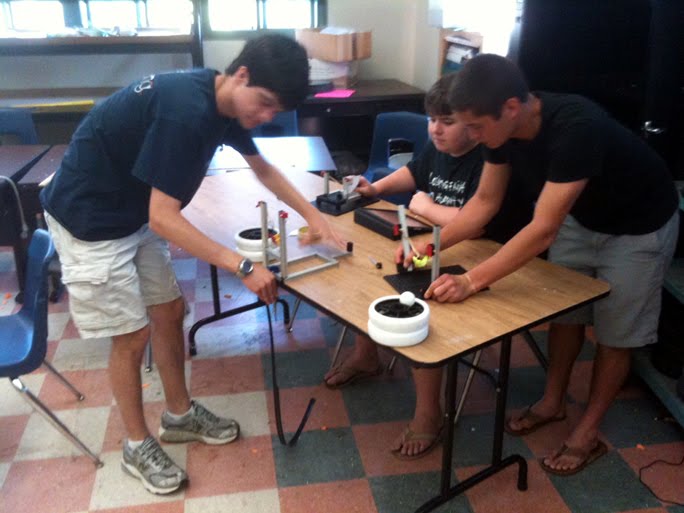
To get the year going, we're going to revisit the POE Final Challenge from the last day of class last year.
This is a great opportunity to start working with a team and see how we can take data, visualize it and then use the data to make choices regarding overcoming a challenge. This is a "game" so please approach the challenge with a spirit of fun! I hope we can enjoy kicking off the year with this as a first (of at least two) warm up project(s).
Phase 1: Design/Build
Construct a ping pong ball launcher according to the following criteria and constraints:
Criteria
-Adjustable launch trajectory (use provided protractor) or adjustable pull.
-Be able to launch a ping pong ball within a range bracket of 10 to 20 feet.
-Be as accurate and precise as possible within this range window (significant to next phases)
Constraints
-Use provided materials (Fischertechnik, rubber bands, popsicle sticks, pipecleaners)
-Limited adhesives/tape - no major structural dependency on tape
Document your launcher by posting a photograph to your blog. Briefly list any key features of your design.
Phase 2: Test & Visualize Data
-Collect a minimum of ten data points (you may want to do more).
-Correlate launch angle or pull distance (depending on which design you pursued) with distance ball traveled.
-Put your data into Power Point and visualize it with a graph of Angle/pull vs. Distance
Post your Power Point graph to your blog
Phase 3: Friendly Competition
We will hold a target practice tournament with our launchers. Using a competitive bracket, teams will be paired up and take turns to see who can be first to hit a target placed between 10 and 20 feet from their launchers. Winners will advance.
List how far you were able to advance in the tournament
Phase 4: Clean Up
Have your launcher fully broken down and parts returned to their bins by the completion of the period.
Basic Data Visualization
Very straightforward but I'd like to see each Engineering Projects visualize data in one of the two formats shown below (pull or trajectory vs impact distance) for their Ping Pong Launcher entry. Please let me know if you have any questions!


Friday, August 26, 2011
Haze Fest
Wow... I'm glad I wasn't new this year...

Kudos to the new teachers for their bravery! Welcome aboard!

Kudos to the new teachers for their bravery! Welcome aboard!
Thursday, August 25, 2011

Subscribe to:
Posts (Atom)