Strategic use of images can make your blog posts more memorable. Use a photo in each of your blog posts to enhance them. Here are some guidlines for you to keep in mind when using images:
A) Make sure a photo adds value to your post.
B) Use them in moderation beyond a single photo.
Added value is the underlying criteria when considering whether to use a photo.Often times, you may want to crop or edit an existing photo to make it more effective. We have MS Paint installed on all of our class computers. If you can't find the program in the start window, you can follow
Jordan's instructions to run the software.
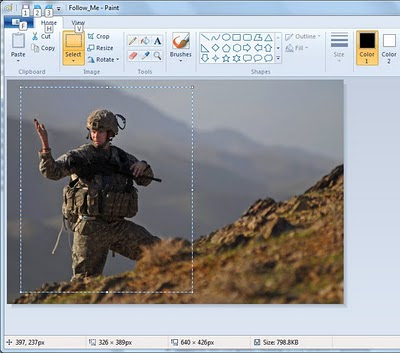
Cropping a photo in MS Paint is straightforward. Use the select button to make a rectangular selection on the photo, then crop it with the crop button:
The cropped result (trivia: This infantryman is a recent member of the infantry battalion CPT Olson served in 10 years ago):

Save the result and insert to your post by selecting the "Add Image" button at the top of your post window and browsing to the location of the file.
**Update**
It's been brought to my attention that the class computers use an older version of Paint. Please see
Jordan's instructions on how to crop an image an Old MS Paint here.


