Engineering Curriculum at Coronado High School: 2010 - 2014

Wednesday, February 16, 2011

Machine Control: Activity 3.1.4 Branch Functions


Overview:
Summarize the activity in a sentance (The "What?" and the "Why?")

List your team members (The "Who?") and describe your contribution to the project.
-Who used the RoboPro software?
-Who built the hardware?
-Who prepared your images?
-Who on your team made the greatest contribution to the effort?

Product:
Post a screenshot of your program and your hardware set up for each of your function blocks (analog and digital).

Conclusion
Copy and paste the following conclusion questions into your post and answer them:

1. Describe why it is important to include branches in programs.

2. Describe an everyday application of a normally open switch that has not been given as an example.

3. Describe an everyday application of a normally closed switch that has not been given as an example.

Tuesday, February 15, 2011

Machine Control: Project 3.1.7 Machine Control Design - Part I


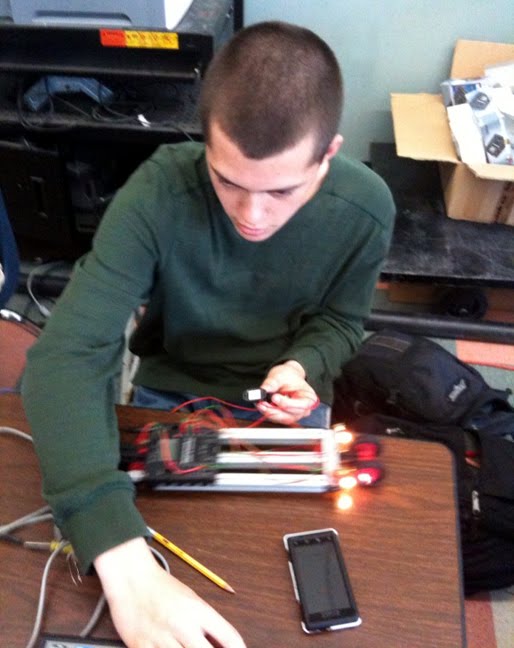
Jackson implementing his machine control design


Period 2 Due Date: COB Thursday 2/17
Period 4 Due Date: TBA

Post the following to your blog as a deliverable for this class project:

-Title your post: Project 3.1.7 Machine Control Design - Part I

Overview
-Summarize the activity in a sentance (The "What?" and the "Why?").
-List your team members (The "Who?").
-Describe your team's effort:
--Who programmed the RoboPro software?
--Who built the hardware?
--Who prepared your images?
--Who was your MVP (who on your team made the greatest impact) and why?

-Explain which Problem you chose to tackle for this exercise

Product
-Sketches of two initial possible hardware solutions.
-Sketches of corresponding program flowcharts to control possible hardware solutions.
-Explanation of how the team iterated from these initial designs to their final product.
-Screenshot of final program with descriptions.
-Image of the final hardware solution.

Conclusion
Copy and paste the following conclusion questions into your post and answer them:

1. What was the most difficult part of the problem?

2. List and describe two features that were not part of the design problem that could be added to improve your design.

Monday, February 14, 2011

Visual Design: Elements and Principles

The purpose of this activity is to have you identify the visual design elements that appear in commercial products, and the visual design principles by which they were arranged.


Questions:

1) What are the 6 Visual Design Elements we discussed in class?

2) What are the 5 Visual Design Principles we discussed in class?

3) Locate five items at home or at school that utilize the elements and principles of design. Post an image of each product. List and explain any visual design elements or principles that are evident in that product.

***Update***
I found a link to the Visual Design presentation online. If you need any clarification on what we discussed in class, please click HERE

Friday, February 11, 2011

The Revolution Will Be Televised

Part 1:

Q - What technologies facilitated the regime change we witnessed in Egypt today? List 3. Describe how each technology came about and how each were used in support of the protest.


Part 2:
Does anyone know Arabic? The following is a list of "essential equipment" protest organizers disseminated to participants (click photo for larger version):


Q - List each of the items displayed in the image. Make your best guess about how they could be repurposed to support peaceful demonstration in the face of an authoritarian regime.

Thursday, February 10, 2011

Less is More


A great article on elegant design that Mr. Vollstedt pointed out to me.

If "Elegance" in design is doing more with less, how will the New Balance 890 accomplish this?

Which steps of the PLTW 12 step design process did the New Balance Designers use?

Be specific with your answers.

Machine Control: Activity 3.1.2 Flowcharting

Post images of your flowcharts for steps 1 through 3.

Answer the following two conclusion questions (copy and paste these questions into your blog so a reader understands the context of your answers):

1. How is flowcharting similar to using a map to plan a route for a trip?

2. Describe a process that you perform every day. Develop a flowchart that illustrates the process.

Hustle and Flow

We've looked at input and output devices we can use to control simple and complex machines. Now we need to start understanding how we can use logic to make use of these inputs and outputs in our systems.

Flowcharts are a way of visually conceptualizing the logic of a program. Here is a hasty example I put up in 4th Period that visualizes the system from problem 1 of Activity 3.1.2:

Wednesday, February 9, 2011

Machine Control: Activity 3.1.1 Inputs and Outputs


Include an image that helps tell the story of your experience with this activity (screen shot of test interface with data or image of TX Controller with attached input and/or output).

Provide answers/data for relevant steps.

Answer conclusion questions (copy and paste these questions into your post and then answer them):

1. Examine the wire diagram on the mini switch and describe how the diagram relates to the concepts of normally open and normally closed.

2. If computers only understand digital signals, then how is a computer able to interpret the analog signals coming from the interface?

3. Why does resistance decrease as the NTC Resistor becomes warmer?

I/O

Last semester we learned about simple and complex machines. It's neat to understand the mechanics of these systesm but real utility is achieved when we can automate them to perform a physical task for us.

Understanding the available inputs and outputs of our Fischertechnik robotics kits is the first step on our journey into this realm of Machine Control. We will use these devices to create automated machines.

A potentiometer, or "pot", is an analog device that can be used to vary resistance in a circuit. Here is one connected to an input in our TX controller:


To read the full range of resistance, the drop down menu needs to be set to the analog setting, otherwise you'll just read a "O" or "1" of a digital input:


Although a pot is an analog device, we are reading it through a digital system. The idea of using many steps to make a smooth curve may be familiar to those that are taking Calculus. 5000 steps makes a nearly smooth line from all the way "closed" to all the way "open":

Tuesday, February 8, 2011

Paint.net

MS Paint is not awesome. Thank goodness for free to use software like Paint.net that is:


If you're ready to do some image editting for your blog posts and need something more robust than MS Paint to crop/edit/etc your images, let me know and I'll instal Paint.net for you.

Enter the Matrix

A matrix is a two dimensional array of rows vs. columns. We can use a matrix of rank ordered design solutions vs. individual criteria/constraints to help us choose the best design for a given challenge.


If the constraints and criteria above are listed as low being better, which of the three designs is "best" according to the matrix?

When you do your own Decision Matrix for your design projects, be specific about naming your designs and criteria/constraints ("Stapler Organizer" instead of "Design 1").

How could you use a multiplier to weight an individual criteria/constraint as more or less important? If you wanted to make a criteria 50% more important than a non weighted criteria/constraint, what would you multiply it by?

Gamification


I'd like to make this an "Opt In" assignment (fitting since it's about Game Design and the gamification of everything around us!) but don't have any questions for it yet.

So if you choose to pursue this one for an Opt In assignment, watch the video and create three questions and answers you think best capture the spirit of the video!

Monday, February 7, 2011

Engineering Design: Project 2.4.1 - Design Project

Please post the following to your blog in support of this project:

1) A brief summary of the challenge so that you introduce an uninformed reader to the nature of the effort. List who your partner is.

2) Why did you choose the design brief that you chose to work on?

3) Share insight on steps 1, 2 and 4 of the 12 step PLTW design process.

4) Post images/scans of your 3 possible solution sketches. Highlight any important features. Sketches should have a scale listed and a description of which perspective is shown. Call out any key features.

5) Post an image of your decision matrix and explain results.

6) Model your solution in Inventor and post appropriate images (alt+PrtScn to take a screen shot of the active window. Use Paint to crop your image).

7) Images/Scans of your marketing brochure.

Sunday, February 6, 2011

Super Advertising

What was your favorite Super Bowl commercial?


For your favorite commercial, how much product (cars, bags of chips, etc.) will the company in question have to sell to pay for their add? In other words, how much does a super bowl add cost and how much does the manufacturer make off of each widget they sell? How many people see a super bowl add? Do you think it's worth it to advertise during the super bowl? Suport your answer with numbers and explain your assumptions.

Friday, February 4, 2011

The Home Team!

Mrs. Olson thought it would be fun to drop in on class today. I have to admit, it really caught me by surprise! Dane Thomas with his Visitor's Pass:


Monti and Ellie have been making good progress on their design project. Here they're showing Mrs. Olson their product sketches and blog work:


We've been talking a lot about teamwork in the last weeks so I'm glad I could introduce many of you to my great team mate. We'll have Mrs. Olson back to class soon and I hope that more of have a chance to meet her.

Thursday, February 3, 2011

A Picture is Worth 1000 Words

Strategic use of images can make your blog posts more memorable. Use a photo in each of your blog posts to enhance them. Here are some guidlines for you to keep in mind when using images:

A) Make sure a photo adds value to your post.
B) Use them in moderation beyond a single photo.

Added value is the underlying criteria when considering whether to use a photo.

Often times, you may want to crop or edit an existing photo to make it more effective. We have MS Paint installed on all of our class computers. If you can't find the program in the start window, you can follow Jordan's instructions to run the software.

Cropping a photo in MS Paint is straightforward. Use the select button to make a rectangular selection on the photo, then crop it with the crop button:


The cropped result (trivia: This infantryman is a recent member of the infantry battalion CPT Olson served in 10 years ago):


Save the result and insert to your post by selecting the "Add Image" button at the top of your post window and browsing to the location of the file.

**Update**
It's been brought to my attention that the class computers use an older version of Paint. Please see Jordan's instructions on how to crop an image an Old MS Paint here.

Engineering Gnome Was Here

The infamous Engineering Gnome has struck and left us a ginormous puzzle cube in the classroom!


All in a night's work for Engineering Gnome...

Read This POE!

Cold Santa Ana winds yesterday and today tie right in with our upcoming analysis activity. Read this article from the UT to prep on wind turbines (click the photos to enlarge them):


Tuesday, February 1, 2011

Notes from Aboveground

I was fortunate yesterday to participate in the School District's Strategic Planning Meeting. Although there were 35 participants, we represented a cross section of the districts constituents (students, parents, administrators and teachers from the four schools) making myself and Mrs. O'Keefe the only high school instructors present. You inform my perspective on education so you had some indirect influence on the direction of the school district.


I worked with a group developing strategies to adress the "21st century learner" and technology needs. Here were some ideas that got put up on the board:


This was an important strategy we developed at the end of the meeting. Expect that this will inform the design of much of our remaining curriculum for the year: