Engineering Curriculum at Coronado High School: 2010 - 2014

Thursday, February 13, 2014

Flappy Birds Recommended

Dong Nguyen, developer of Flappy Bird, recommends the Corona SDK for game development. This is the software tool we've been using in our Engineering Design course :)

Friday, January 31, 2014

Superadvertising 2014!!!

Whether the Superbowl is a good game or not, you can always count on companies and advertising agencies to bring out their "A game" for the commercials. What was your favorite add that you saw?

I thought this one was pretty funny last year. My dog Lucy has a bit of a "goaty" look at times and she can be a real beggar for food so this commercial resonated :)


Advertising isn't engineering, but as designers and problem solvers, there are some interesting considerations worth thinking about. Any technical project takes planning and money and there's a risk/reward payoff for the venture just like with these commercials.


To add a little variety to this week's CAD work, please complete the following on your online portfolio:

- What commercial most caught your attention this year? Use html code to embed the video on your blog.

- What about the commercial made it memorable?

- How much does it cost to air a commercial during the super bowl?

- What other expenses go into producing a commercial? What kinds of costs might these activities incur? (there's not a "right" or "wrong" answer for this, do some google research and justify a value)

- How many "widgets" (whatever the company is selling) will the company have to sell to cover the cost of their commercial? Share some math that justifies your answer.

- Do you think this ad will cover it's costs directly (sell as many "widgets" as it cost to produce and air)? Does a superbowl ad have value beyond direct sales that it generates?

Thursday, January 30, 2014

App Development!

Would anyone be excited about an app development course? The idea had been brought up and had administration traction (not sure where things stand now with the looming staff cuts...)

Here we have Sam, Jason and Marshall testing out Thirsty Dwarf! They're going to try their hand at building some custom sprites...


Guys, here is a sprite sheet you can reference for your sprite work:


Wednesday, January 15, 2014

Lego Robotics Challenge!


The Principles of Engineering courses are starting their units on robotics! We will begin with a series of introductory challenges that will create some opportunities to think about software and hardware integration in the context of machine inputs and outputs.


Autonomous Challenge 01 - "Straight Line" race
  • Create an autonomous vehicle with Lego Robotics parts (task) in order so that it will traverse a 3ft straight line course. This activity serves as an intro/familiarization to your Lego Robotics kits (purpose).
  • Design, build, document and share your solution.

Autonomous Challenge 02 - "Bent" course race
  • Modify your design so that it can navigate a course with a turn in it (see layout at the back of the room). This change is designed to make you implement a solution that requires some sort of sensor input.
  • Design, build, document and share your solution.


Share your experience to this point on your online portfolio:
  • Intro
    • 2-3 sentences summarizing what we're up to.
    • Write from the perspective that the reader is not familiar with our course/efforts.
  • Challenge Review
    • Challenge 1 - straight course
      • Photo of course to set context of challenge
      • Build photo
      • Competition/Action photo
      • Describe outcome
      • Feedback: describe things to sustain and things to improve
    • Challenge 2 - "bent" course
      • Photo of course to set context for design change
      • Build photo
        • Be sure to describe how you addressed the change to the challenge
      • Competition/Action photo
      • Describe outcome
      • Feedback: describe things to sustain and things to improve


Tuesday, January 7, 2014

Engineering Projects: "Masterpiece" Overview

We're talking through these in class today to introduce your "Masterpiece" effort. We will go into more detail as far as how you can earn "XP Points" at a later time.

Professional Interview

A primary objective of our Engineering courses is to give our students a perspective on the different fields of engineering one could pursue beyond High School. What better way to work towards this awareness than to conduct an interview with an engineer?


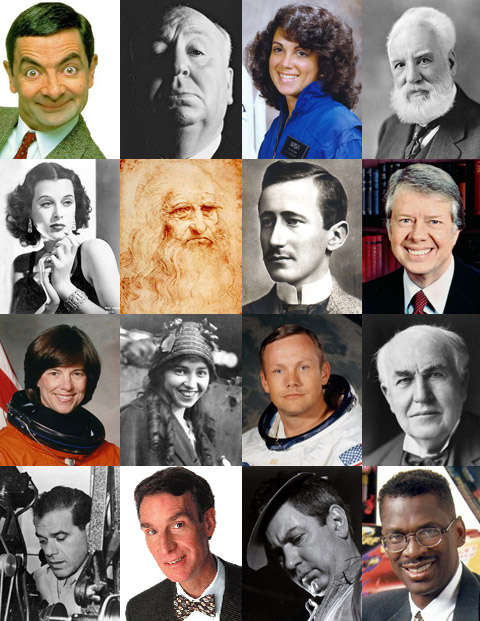
A selection of interesting people with engineering backgrounds. How many of these people can you name?:


Overview
Conduct a personal interview with a professional in the field of engineering, engineering technology, or another high-tech, high-demand field. Interview documentation must follow the outline format described below and consists of three major components: Professional Background; Interview; Interviewer Reflection. Completed interview documentation must be posted to your online portfolio (blog).


1. Discuss with your instructor who you would like to interview. Obtain instructor approval.

2. Contact the person you will be interviewing and obtain consent.


Professional Background

3. Gather the information below. Use the buddy system for all interviews. No interviews are to be conducted in private

a. Interviewee name:

b. Interviewee’s specific degree:

c. Interviewee’s place of employment:

d. Interviewee’s email address and/or phone:


Professional Interview

4. Conduct your interview. Be sure to cover the following questions. Are there any other questions you'd like to ask?

· Please describe your engineering field.


· What is your current job title?


· Please describe your particular job and duties.


· What is your average work schedule?


· Starting with high school, describe your educational background chronologically.


· If you had it to do over, related to your career or education, would you do anything differently?


· What advice would you give to me as someone interested in pursuing a career path similar to yours?


Personal Reflection

5. Reflect on your completed interview and answer the following questions. You may also add additional reflections or thoughts.

a. What surprised you the most about the interview?

b. What was the most important piece of information that you learned form the interview?

c. How has this interview influenced your feelings about your future career?

Wednesday, December 4, 2013

Manila Folder Bridge Design-Build Challange!

We will conduct our Design-Build challenge in two parts. By iterating on our effort, we will have the opportunity to better reflect on our experience and improve our designs. Please note that the constraints for the activity vary for the first and second effort!


Criteria:
Build a structure that can support as much weight as possible over a 18" gap.
(Note: we will use magazines for "weights" and our "gap" will be positioned between two tables)


Constraints:Part 1
    • Materials:
      • 2 "letter size" Manilla folders
      • 2' of masking tape (may not use any piece longer than 6")
    • Weighing:
      • Magazines will be used as "weights"
      • Your "score" for our competition is determined by how many magazines your structure supports!
      • Magazines will be added to your structure one at a time until "failure" is achieved.
      • You may place magazines anywhere on your structure as long as:
        • All magazines must rest between the two vertical edges of the gap your bridge is spanning (magazines must be over the "gap").
        • No magazines may touch the tables (magazines may not be piled up to "self support" themselves).
    • Construction Practices:
      • Only one end of your design may have a "pinned" connection to the table top (ie. taped). The other end must act as if it were on a "roller" connection (ie. laying on the table top).
      • Manila folders may not be layered more than 3 layers thick at any location.
      • Parallel structural members may not touch directly (they can be connected via non parallel connection members (ex. a "ladder" style design))
  • Part 2
    • Same as above but 3 folders and 3' of tape

Monday, December 2, 2013

Puzzle Cube Design-Build Challenge!


Puzzle Cube Criteria and Constraints

• Given 27 wood blocks, assemble a 3x3x3 puzzle cube.
• The cube must be made of 5 puzzle pieces, no more, no less.
• Each puzzle piece may be assembled from 3 to 6 wood blocks.
• You may not repeat any of the puzzle pieces in a given cube.
• Make your cube as challenging to solve as possible! (we'll have a contest!)


Deliverables

1) Possible Puzzle Pieces
• How many individual puzzle pieces are possible for 3, 4, 5 and 6 cubes?
• Draw as many as you can with a 1:1 ratio of squares to cubes on isometric graph paper.

2) 2 or More Puzzle Cube Solutions
• Use your 27 cubes and tape to model at least two possible cube solutions.
• Solutions must adhere to our Criteria and Constraints.
• Record the puzzle pieces for each of your solutions on isometric paper.
• Use the shading techniques we've learned for isometric drawings.
• Choose a solution and specify why you selected it.

3) Build Your Cube
• Use Elmer's glue to glue up the pieces of your chosen solution.
• Color each piece of your cube a distinct color using our class crayons.

4) Step By Step Instructions
• Using isometric paper, create step by step instructions that shows how to solve your cube.
• Each step must show the assembly from the previous step and how the next piece fits in with them ("x+y=z").
• Use the shading techniques we've learned for isometric drawings.

5) CAD Modelling
• Create an assembly of each of your pieces in Inventor.
• Create an assembly of your entire cube in Inventor.
• Create Multiview drawings of each of your pieces in Inventor.
• Create an explosion of your cube assembly in an Inventor Presentation (.ipn) file.
• Animate your explosoion. Make sure you sequence the movement of your pieces so that they don't overlap each other while in motion.
• Record your animation and post the video to your blog.


Saturday, November 9, 2013

Problems Are Opportunities

A good clip for any of our classes but especially noteworthy for AP CS and Engineering Projects. The core competency of big contractors are to win and maintain government contracts. Here, a small team demonstrates that with their low overhead, they can afford to take a shot at solving a national problem and come up with what sounds like a very positive result. When you're small and agile you can afford to make mistakes and quickly iterate on them (fail early, fail often). The video does show some code for a split second. What software did they seem to be using (I think you'll recognize it). Where these people "experts" on the topic or did they just dive in and solve the issues as they came up? Lots to think about how you want to approach your future careers/professions/vocations/callings...

Thursday, October 31, 2013

Duct Tape Mastery

We use a lot of duct tape in my classes (cardboard canoes anyone?)... I was impressed by Troy's artisanship with the material for his Halloween costume. Nice job. Awesome point headed your way!

Boys will be boys...

Josh, Juan and Austin playing the "man up" game with the mousetrap...

4th Annual Mousetrap-Racecar Races!


We've learned about a number of simple machines in the Principles of Engineering courses. A common theme amongst these devices is the concept of using mechanical advantage to trade force for distance or distance for force. How can we use this trade off in context in the classroom?

For this challenge you and a team mate will design, build and compete with a Mousetrap racecar. Specifically, you will use a third class lever and a wheel and axle simple machine to prototype a race vehicle.


Criteria:
Design, build and compete with a Mousetrap Racecar (A "car" uses at least two axles).
Maintain a clean workspace.

Constraints:
One mousetrap
No more than 12" of masking tape
Fischertechnique robotics parts
No more than 24" of string
All materials used must travel with your vehicle
You must work through the stages of the event (see Achievements below)
Additional materials by Instructor approval


Achievements (by stage):
Post your results for the Simple Machine Challenge pt I to your blog. Tally your total number of Achievements earned and justify each within the post. Your grade is the total number of Achievements you earn curved against the number of Achievements your classmates earn.


Design Stage:
"Brainiac" - Brainstorm solutions for your design. Generate a list of at least 10 ideas/concepts.
"Visualize It!" - Create a sketch of a design and label key features.


Build Stage:
"Build It" - Build your design. Document it with a photo.
"The Price of Glory" - If each part you use costs $1, generate a total cost for your build (This info will be used to generate "cost" data to add a pricing element to the game next year).

Test (Compete) Stage:
Each car will compete in two events. Generate your design accordingly.
1) The Distance Event: Compete for the furthest distance. Teams will race one at a time and have up to 3 attempts to achieve the longest distance. We will race on the tiles of the classroom unless the class decides we need more space. Your best result will be marked with a piece of masking tape. The marked location is where the car comes to rest (cars have been known to roll back at times!).
2) The Acceleration Event: Cars will compete head to head in a competitive bracket. The winner of each duel will move on to the next round. The course is 24" long.

"Competitor" - Compete in the 2nd Annual Mousetrap Racecar Challenge.

"Long Distance Winner!" - Travel the furthest in the distance race.
"Going the Mile!" - Travel the furthest or second furthest in the distance race.

"Led Foot" - Be the team to win the acceleration bracket.
"Heavy Foot" - Be the team to win or finish second in the acceleration bracket.

"Feedback" - Collect feedback (at least one each of +, change, ? and !) from yourself or your classmates.


Iterate Stage:
"Re-work" - Change your build based on your experience with the race/feedback you collected. Document any changes.
"Game Changer" - Develop a new rule or change to the game that you feel would make the event better. Explain your concept.
"Name it" - Invent a name for an achievement that you think is better than what we have currently.


Clean Up Stage:
"Leave It Cleaner Than You Found It" - Did you leave your workspace cleaner than you found it? Explain.


Reflection Stage:
"Design/Build" - What is a "Design/Build" process? How did your experience with this challenge relate to that? Why might you experience this in a career related to technical innovation?


There may be an option to compete again (with the same or new rules) depending on the input we receive from the teams and the timeliness with which we complete the event.

Wednesday, October 23, 2013

Lever Magic!

We've been doing some theoretical calculations. Block day is a good chance to move away from theory and into first hand experience...


Thursday, October 17, 2013

Design-Build Challenge 02 - Marble-drop Madness!


Today's "Design-Build" challenge sees what we can do with the following equipment:
-14 straws
-10 toothpicks
-3 paper cups
-3 feet of masking tape
-1 round marble

Goal: release your marble onto a freestanding contraption of your own design located at the edge of your desk. The goal is for your "structure" to direct your marble into a cup on the floor. The winner is the team who's cup is located furthest (horizontally) from the edge of the desk.

Rules: You may only use the materials specified above. Your marble must end up in a cup positioned on the floor in order to earn a result.

Feedback: Score is determined by distance from the table. Your result will be compared against your classmates to determine ranked result (1st, 2nd, 3rd, etc.)


Points! Earn one point for each of the following:
1) Your place in the competition (1st Place = 1 pt, 2nd Place = .9 pt, 3rd Place = .8 pt, etc.)
2) Document your effort on your online portfolio. Include pictures and a bullet point summary of the goal, rules and results you achieved.
3) Clean up! Include an image of at least one of your teammates cleaning up your workspace.

Friday, October 4, 2013

Go Islanders!

I was wearing red today in support of my alma mater, LJHS... that said, I would love nothing more than to see our team beat them tonight at the La Jolla homecoming game. What a great crew we have, good luck!:

Thursday, October 3, 2013

Energy Sources!


Image from classroom-energy.org

Americans spend 500 billion dollars each year on energy. As populations and appetites increase, the world faces a challenge of significantly growing energy needs. Many unique energy sources are available. To meet future energy needs, engineers need to design technology to contribute new ways to harness energy, increase efficiency, and better transport and store energy.


Objective:
Your task as a class is to prepare a presentation on the different energy sources we use collectively as a society (9 types from the graphic above). The class must cover each of the sources listed.

Presentation Grading (5 pts)
The presentation is worth 5 points. 4 points will be earned by each team and the remaining point will be awarded collectively to the class. If you address the content and process standards below, you will earn 4 points. If the class collectively addresses the process standards the 5th point will be awarded.

Product:
- Energy Source - Overview, Steps for Harnessing Energy, Major Energy Uses
- Is the energy source classified as nonrenewable, renewable, or inexhaustible?
- What are the infrastructure requirements for utilizing this energy source?
- What emerging technologies will make this energy source safer, more usable, more efficient, cleaner, etc?
- Consideration of Efficiency/Conservation
- Costs - Setup, Consumer Costs
- Pros/Cons
- Outlook for the future

Process:
- Unified look/theme to entire presentation
- Reduced Text - Use bullets and talk to them
- High Value Images - do they tell a story?


Blog Post Grading (2pts)
Post the images of your section of the "Energy Sources!" Presentation to your Blog. Copy and paste the following questions into your post after your slides and answer them.

1. Describe one thing that surprised you about the energy source that you researched and presented.


2. Describe one thing that surprised you about an energy source that another team presented.


3. Describe and defend what you believe to be the most important technological need regarding energy.


Wednesday, October 2, 2013

Student Work Sample: Cardboard Canoe Challenge Portfolio Post

Caleb has a strong post for this year's cardboard canoe challenge. It's not flawless, but can serve as a good example to keep in mind as you finish/improve your own. Click here to see his post!


Saturday, September 14, 2013

Duct Tape!

Dane helped me pick up a ton of duct tape for our Cardboard Canoe Challenge today :)